Clean-up and the wrong-organization report
A customer in the wrong organization can see that organization’s shared requests. Find them, and other loose ends, and fix them with undo.
The reports
Health → Clean-up: choose the Scope (whole site or one service project) and the No requests in period, then Run the report. It takes seconds (3 seconds for about 150 customers on our test site). The report has five tabs, most important first:
- Wrong organization: customers whose email domain doesn't match any domain of their organization. Only organizations that have email domains in Customer Roster are checked: apps can't read Atlassian's own domain list. Example: These 14 customers have an email domain that doesn't match their organization. They may see that organization's shared requests.
- No organization: customers who aren't in any organization.
- Empty: organizations with no members. Not linked: organizations linked to no service project, so their members can't share requests through them.
- Inactive: customers the app found no request from in the period you chose (12 months by default). This comes from a Jira search, so it is "none found", not "none exists" — a request Jira's search hasn't indexed yet won't be counted, and the list tells you how many requests it actually read. Check anyone here before you remove them. The app reads up to 5,000 recent requests; on a busier site it leaves the list out rather than guess, and if the search finds no requests at all it leaves it out too, because every customer would otherwise be listed.
The Overview tab shows the wrong-organization count under Needs attention.
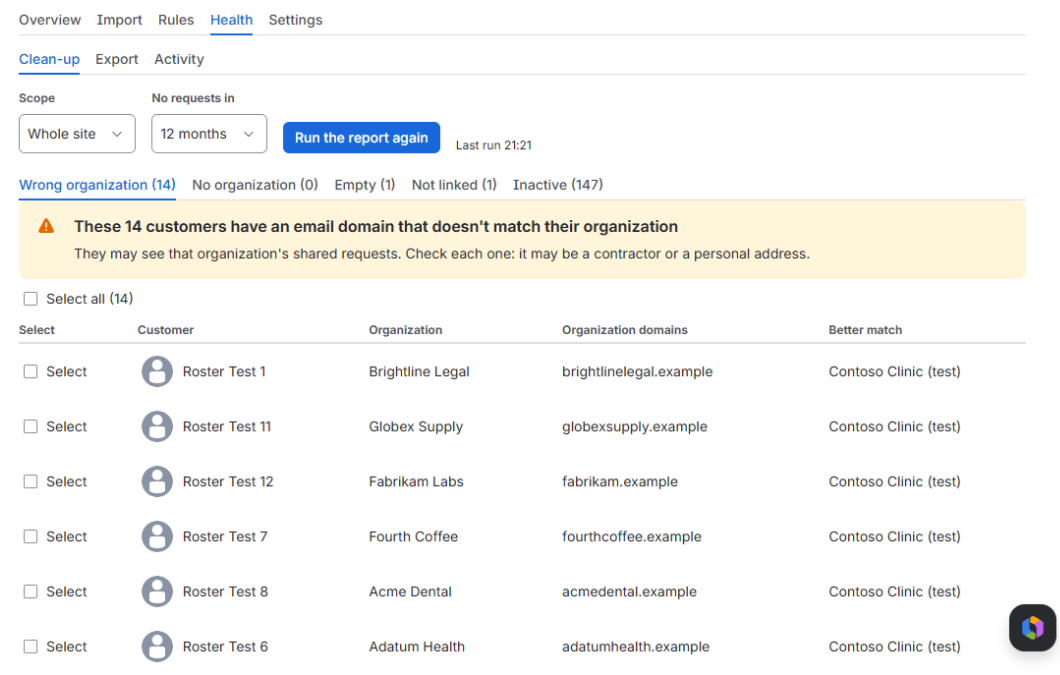
Fixing
Tick rows (or Select all) and press the action. One action makes up to 500 changes; if you select more, the preview says how many are left for a second run, so nothing is dropped without telling you. The button counts what you picked:
- Remove 3 selected from their organization
- Remove 3 selected from RT: you choose the project under Remove from which project (on a project's own page, it's always that project)
- Unlink 2 empty organizations from their projects (the organizations stay)
One action changes up to 500 memberships or links. Recent clean-ups lists what you did, each with Undo. A report is kept for 7 days.
Every action is previewed first, recorded in the activity log, and can be undone. These are removals you choose, so they can include members someone added by hand — that's the point of the report. Automatic syncs never do that.
"No organization" and "inactive" list portal customers only; agents and other Jira users who happen to be customers of a project are left out. Removing someone from a project doesn't stop them seeing it through an organization linked to that project: remove them from the organization too. If a sync rule had added someone you remove from an organization, the rule treats it like an agent's removal and doesn't add them back.
What clean-up never does
- Delete customer accounts or organizations.
- Change anyone's email address.
To delete accounts, use Jira Service Management or Atlassian Administration.